Closures is easier than you think
India
Closures are often called one of the most confusing JavaScript topics.
The confusion does not come from syntax.
It comes from not seeing what happens in memory.
So in this blog:
We keep all the code
We explain step by step
You can visually see how JavaScript remembers variables in memory level
1️⃣ Inner & Outer Function – The Foundation
function outer() {
    let x = 10;

    function inner() {
        console.log(x);
    }

    inner();
}

outer();
What the code is doing
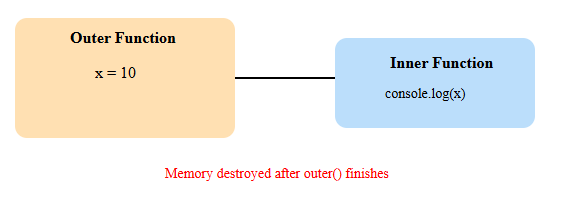
outer()creates variablexinner()usesxinner()runs whileouter()is still executing
Visual: Scope without Closure
Key takeaways from this section?
Inner functions can access outer variables
Memory is destroyed after
outer()finishesThis is NOT a closure yet
2️⃣ Making It a Closure (Returning the Inner Function)
Now we change only one thing.
function outer() {
    let x = 10;

    return function inner() {
        console.log(x);
    };
}

const func = outer();
func();
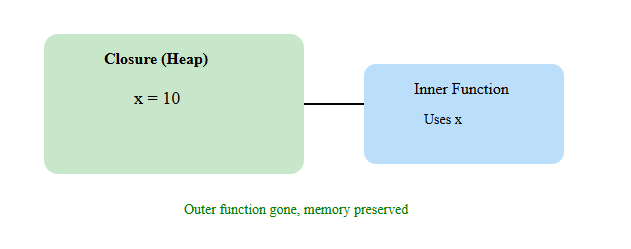
What changed?
inner()is returnedouter()finishes executionBut
xis still accessible
Visual: Closure Retaining Memory
Why this works
funcstill referencesinnerinnerstill referencesxGarbage Collector cannot remove
x
This is a closure which I was talking about since now
3️⃣ Closure with State
function outerCount() {
    let count = 0;

    return function innerCount() {
        count++;
        console.log(count);
    };
}

const retVal = outerCount();

retVal(); // 1
retVal(); // 2
retVal(); // 3
What to notice
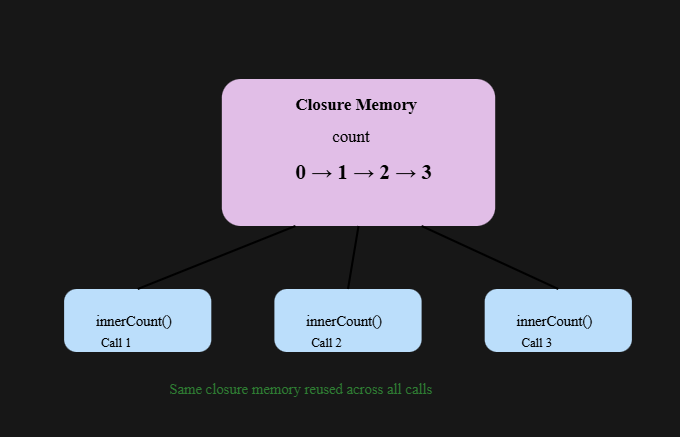
outerCount()runs oncecountis created onceValue is remembered
Visual: State Preserved Across Calls
Key insight
Closures do not reset variables
They remember the last value [Important lession]
4️⃣ Real-World Closure – Bank Account (Encapsulation)
function createBankAccount(initialBalance) {
    let balance = initialBalance;

    return {
        deposit: (amount) => {
            balance = balance + amount;
            console.log("Deposited ", amount, " Current Balance ", balance);
        },

        withdraw: (amount) => {
            if (amount > balance) {
                console.warn("Insifficient Fund");
            } else {
                balance = balance - amount;
                console.log("Withdrawn ", amount, " Current Balance ", balance);
            }
        },

        checkBalance: () => console.log("Current Balance", balance),
    };
}
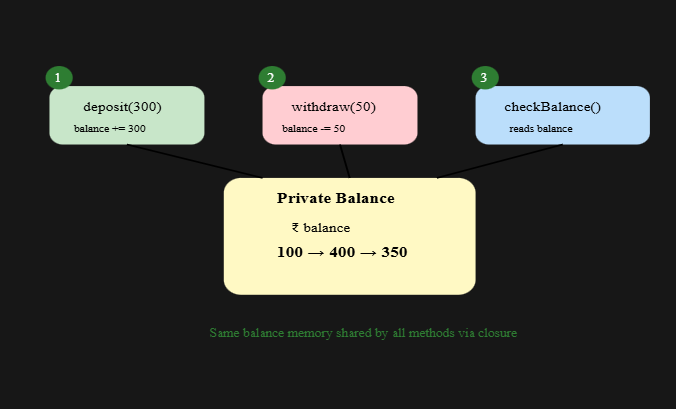
How This Maps EXACTLY to my Code
Code Execution
const BipulAccount = createBankAccount(100);

BipulAccount.deposit(300);   // 400
BipulAccount.withdraw(50);   // 350
BipulAccount.checkBalance(); // 350
What the diagram shows
deposit(300)
- balance:
100 → 400
- balance:
withdraw(50)
- balance:
400 → 350
- balance:
checkBalance()
- reads current value:
350
- reads current value:
All three functions:
Share the same closure memory
Do not create new balance
Only read/update existing balance
Visual: Encapsulation Using Closure
5️⃣ Closures Can Cause Memory Leaks (Big Data) so where not to use closure
function dealingWithBigData() {
    let bigData = new Array(10000000).fill("*")

    return function() {
        console.log(bigData[3])
    }
}

const variable12 = dealingWithBigData();
variable12();
What Learners Usually Miss (Core Problem)
Most people think:
“I’m only using
bigData[3], so the memory should be small.”
Which is absolutely Wrong
What actually happens:
Closure keeps a reference to the entire
bigDataarrayGarbage Collector cannot free it
Memory stays allocated as long as the closure exists
This must be seen, not just read.
Correct Execution Flow (Step by Step)
Step 1️⃣ — Outer function executes
const variable12 = dealingWithBigData();
bigDataarray is created (10,000,000 items)Inner function is returned
Outer function finishes execution
Normally memory would be cleaned…
but NOT here.
Step 2️⃣ — Closure is created
variable12now holds the inner functionInner function references
bigDataEntire array stays in memory
Step 3️⃣ — Inner function executes
variable12();
Only
bigData[3]is accessedBut whole array is still retained
Memory Leak via Closure
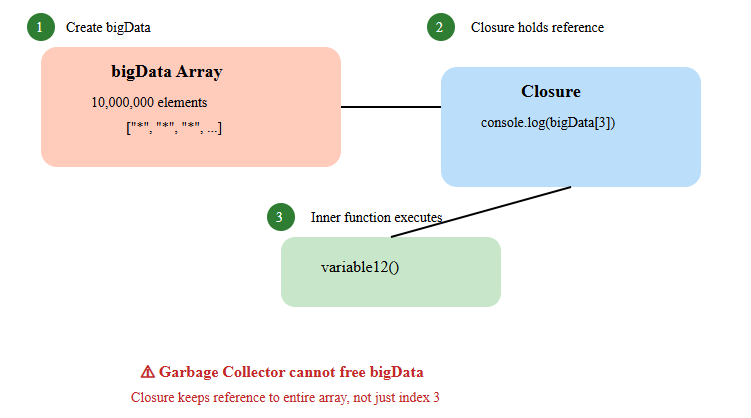
So, Be careful when closures hold large objects.
One-Line Takeaway for Readers
Closures don’t leak memory — long-lived references to large data do.
6️⃣ Timer Example – State Across Calls
function timer() {
    let secs = 0;

    return function() {
        secs++;
        console.log("elaspsed seconds ", secs)
    }
}
A Short Story from the JavaScript Engine’s Point of View
Hey again. JavaScript Engine here.
Let me tell you what happens when you run this timer code.
🟢 Scene 1: Timer Is Created
You write:
const timerInstance = timer();
I say:
“Alright, let me execute
timer().”
Inside the function, I see:
let secs = 0;
So I do this:
“I’ll create a variable called
secsand set it to0.”
Then I see:
return function() {
    secs++;
    console.log("elapsed seconds ", secs);
}
I pause and think:
“This function uses
secs.”
That’s my trigger.
So internally, I create this relationship:
timerInstance → inner function → secs
Then I finish executing timer().
Scene 3: First Call
You write:
timerInstance();
I execute:
secs++; // 0 → 1
And print:
elapsed seconds 1
I do not recreate secs.
I just update it.
🟢 Scene 4: Second & Third Calls
You call it again:
timerInstance();
timerInstance();
From my side, this is what happens:
secs = 1 → 2 → 3
What I think:
- “Same function. Same memory. Just update the value.”
What You Should Learn from This
I don’t restart secs because timer() never runs again.
I reuse the same closure memory every time when i call the function.
One-Line Rule
- Closures allow variables to live beyond their function’s execution and evolve over time.
7️⃣ Closures in Event Handlers
function setupButton() {
    let clickCount = 0;

    document.getElementById("myButton").addEventListener("click", function() {
        clickCount++;
        console.log(`Button clicked ${clickCount} times`);
    });
}
A Short Story from the JavaScript Engine’s Point of View
Still me. JavaScript Engine.
Now let’s talk about buttons and clicks.
Scene 1: Setup Phase
You write:
setupButton();
I execute setupButton() and see:
let clickCount = 0;
I say:
“Okay, click count starts at zero.”
Then I see:
document.getElementById("myButton")
  .addEventListener("click", function() {
      clickCount++;
      console.log(`Button clicked ${clickCount} times`);
  });
I immediately notice something important:
“This event handler function uses
clickCount.”
So I do this internally:
event handler → clickCount
Then setupButton() finishes execution.
Scene 2: setupButton() Is Gone — But clickCount Is Not
Normally I would clean everything up.
But I stop myself:
“Wait. The event handler is still registered.”
That means:
The function still exists
It still references
clickCount
So I keep clickCount alive.
This is another closure.
Scene 3: First Click
User clicks the button.
I execute the handler:
clickCount++; // 0 → 1
Console shows:
Button clicked 1 times
Scene 4: More Clicks
Each click triggers the same function.
From my perspective:
clickCount = 1 → 2 → 3 → 4 → ...
I think:
“Same handler. Same memory. Just increment.”
I never reset clickCount, because:
setupButton()does not run againThe handler closure is still alive
Important Detail Most People Miss
The event handler:
Is not re-created per click
It is created once
And reused forever (until removed)
That’s why the count keeps increasing.
Final Mental Picture
If a function still has access to variables even after its outer function is gone — that function is a closure.
Closures are:
Predictable
Powerful
Everywhere in JavaScript